
So, this is one of those relatively simple blogs that I’m sure lots of people have developed their own processes to handle, however I thought I’d share a lightweight approach recently explored with a customer who wanted to fire off emails to recipients with the output of a SQL script attached to said email. Essentially, the tried and tested report-bursting for tabular data.
Now, before I go any further it would be remiss of me not to mention the native notification capabilities already built into Databricks for this kind of scenario, namely Alerts. This blog doesn’t cover Alerts but essentially these are alerts that fire off based on specific conditions, then if triggered, the designated operator/channel is notified. It’s a powerful and rich feature and should definitely be your first port of of call for such a scenario. (There are also notifications built into jobs and workflows too, but that’s not relevant for this scenario)
In the scenario for this customer, they have many scripts that essentially act as rules to be checked, and the output of said rules needs to be sent to individual teams to review and act upon. In principal, you can do this with Databricks Alerts, however there some nuances such as the number of scripts (rules) to be evaluated and the need to physically send the result set out as an attachment too which meant we explored other approaches.
Assuming we’re happy why Alerts isn’t perhaps the best approach for this scenario, let’s look at the proposed approach, which is essentially a lightweight metadata-driven approach to doing this at scale.
As always, this is by no means *air quote* production-ready *end air quotes* but hopefully it gives the bones of an approach that others can use and extend in the future.
With that in mind, let’s get to the approach. I’ll keep it brief as I know i’m competing with other more dopamine-creating activities when this is being browsed on a mobile phone 😀
The Scenario
- You have lots/many of SQL scripts that need to be run and results returned
- For each run of a given script, you need save the results as an attachment and send it the assigned recipients
- You need to do this with native Databricks functionality (aside from your email server) as much as possible
Prerequisites
- A Unity-Catalog enabled Databricks Workspace (shocking, I know)
- A Schema and Volume that you have read/write access to
- An SMTP server you have the relevant details for (I used gmail in this example)
The Fun Stuff
1 – Create Supporting Functions
Initially, I was exploring dynamically creating alerts, notifications, queries and other things programmatically, but after exploring these options I realised all I really needed were two functions – one for the email send and one to convert the data to pandas (yes, yes, I know what people will say to that. These datasets are small, so pandas is fine, for large ones uses spark native csv approaches so you don’t overload the driver).
The functions were placed in a helper notebook and %run as part of the main one but in reality handle them in any way that suits your needs:
import smtplib
import os
from email.mime.multipart import MIMEMultipart
from email.mime.text import MIMEText
from email.mime.base import MIMEBase
from email import encoders

def send_email_with_attachment(subject, body, to_emails, smtp_server, smtp_port, smtp_user, smtp_password, attachment_path=None):
    msg = MIMEMultipart()
    msg['From'] = smtp_user
    msg['To'] = ', '.join(to_emails)
    msg['Subject'] = subject
    msg.attach(MIMEText(body, "html"))  # ✅ Force HTML format


    # Attach email body


    # Attach file if provided
    if attachment_path:
        if os.path.exists(attachment_path):  # Ensure file exists
            attachment_name = os.path.basename(attachment_path)
            with open(attachment_path, "rb") as attachment:
                part = MIMEBase("application", "octet-stream")
                part.set_payload(attachment.read())

            encoders.encode_base64(part)
            part.add_header(
                "Content-Disposition",
                f"attachment; filename={attachment_name}",
            )
            msg.attach(part)
        else:
            print(f"Warning: The attachment '{attachment_path}' was not found!")

    try:
        # Connect to SMTP server and send email
        server = smtplib.SMTP(smtp_server, smtp_port)
        server.starttls()
        server.login(smtp_user, smtp_password)
        server.sendmail(smtp_user, to_emails, msg.as_string())
        server.quit()
        print("Email sent successfully with attachment!")
    except Exception as e:
        print(f"Failed to send email. Error: {e}")
And for the panda/csv conversion –
import pandas as pd

def save_dataframe_to_csv(df, output_path):
    """
    Converts a Spark DataFrame to Pandas and saves it as a CSV file.

    Parameters:
        df (pyspark.sql.DataFrame): The Spark DataFrame to convert.
        output_path (str): The file path where the CSV should be saved.

    Returns:
        None
    """
    try:
        # Convert Spark DataFrame to Pandas
        pandas_df = df.toPandas()

        # Save to CSV (without index column)
        pandas_df.to_csv(output_path, index=False)

        print(f"CSV successfully saved to: {output_path}")

    except Exception as e:
        print(f"Error saving CSV: {e}")
2 – Metadata Creation
First of of all I bring in my functions:
%run ./helper_functionsAnd then define some key parameters, note some of these are test ones that are replaced at runtime by subsequent code:
#define variables
catalog = '[insert your catalog here]'
schema = '[insert your schema here]'
subject = "Acme Alerts Notification"
body = "Please find attached your latest notification"
to_emails = "user.user@databricks.com"
smtp_server = "smtp.gmail.com"
smtp_port = 587
smtp_user = "user@user.com"
smtp_password = <put your secret here>
I then create and populate the main table with some example metadata:
#Creates base table and inserts some example metadata references for the email recipients and SQL scripts

create_table = f"""
              create or replace table {catalog}.{schema}.emailmapping
              (
                ID integer,
                sqlscript string,
                email string,
                display_name string
              );

              """

insert_rows = f"""insert into {catalog}.{schema}.emailmapping (Id, sqlscript, email, display_name)
              values (1,'cc_alert_test_customers', 'user1@userdomain.com', 'user1'),
              (2, 'cc_alert_test_orders', 'team@userdomain.com', 'user2');
              """

spark.sql(create_table)
spark.sql(insert_rows)
This populates our emailmapping table with some perfunctory example data:

For this demo, I now create a couple of example scripts to be used. These are views in this case but can be views or tables as needed. The customers one, for reference, is below:
#create test queries/views

spark.sql(
  """
    create or replace view YOURCATALOG.YOURSCHEMA.cc_alert_test_customers
    as
    select * from YOURCATALOG.YOURSCHEMA.customers
    """
)
3 – Run and Send
With our metadata created and our scripts ready to go, I can now run the necessary code that runs the queries, saves them to a volume in Unity Catalog, then sends them out as an attachment:
## Run and store queries, then fire them out
from pyspark.sql.functions import current_timestamp, concat

email_mapping_df = spark.table(f"{catalog}.{schema}.emailmapping")

for row in email_mapping_df.collect():
    query = f"select * from {catalog}.{schema}.{row['sqlscript']}"
    df = spark.sql(query)
    path = '/Volumes/<YOURCATALOG>/<YOURSCHEMA>/emailfiles/'
    pathtosave = f"{path}{row['sqlscript']}.csv"
    print(pathtosave)
    save_dataframe_to_csv(df, pathtosave)
    send_email_with_attachment(subject, body, email, smtp_server, smtp_port, smtp_user, smtp_password,attachment_path=pathtosave)
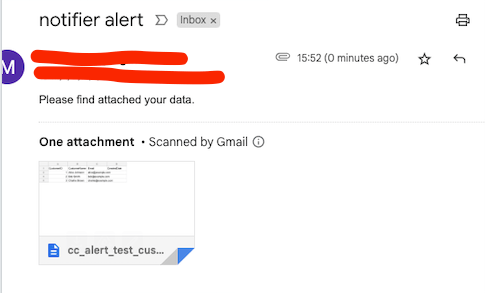
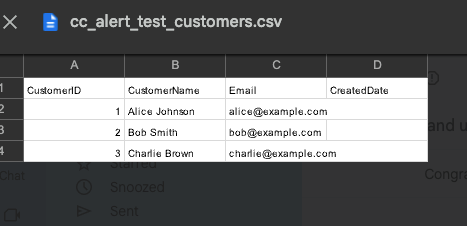
4 – Email Received
And low and behold, our email arrives as expected:
Conclusion
That’s pretty much it. In reality it’s fairly simple as an approach and it’s one of many that can be adopted for such means (Logic Apps is a common one I’ve seen referred to if you’re coming from Azure world). Also sending large files via email isn’t great generally so it might be good to consider approaches that simply share the URL in the Volume with a recipient that they can access directly. In production too you’d look to wrap it with proper auditing, retry logic and other bits and pieces as required.
Hopefully though this has given some ideas on a how you could approach a similar ask.
 SQL Of The North