
I had a recent challenge from a customer that involved the need to join together datasets from different regions and present them as a unified view of data WITHOUT the data itself leaving it’s specific locality.
This meant that using something like Data Factory to ingest and transform the data was a no go as the need was for the data to remain where it was, and only the resultset to returned to the user. Instead, I turned to seeing what other approaches would work to accomplish the same task.
In the end, we settled on a solution using Power BI and composite datasets but at the same it uncovered a new approach that allowed for the unifying of data across Synapse workspaces that I hadn’t considered before, and wanted to share here.
The end goal here was to present a single endpoint that joined the underlying datasets together without the querying user being aware of where the data was coming from. Not only that, we also needed to demonstrate row level security would work in such a scenario, so that users in Country A couldn’t see data from Country B and superusers could see all data.
Serverless SQL Pools were the solution for this, and in short (for those of you who just want the base steps to take away) – we did the following –
- Created files (parquet) for the required dataset and stored them in the default data lake storage for each regional workspace
- Mapped the remote storage accounts to the consuming Synapse workspace
- Created a Serverless SQL view on top of each remote dataset. Eg, “vUSSales”
- Created a view in the consuming workspace that Unioned the different regional views together as one single view
- Applied row level security to the unioned view
- Connected to the unioned view (eg vAllSales”) that then queried all the regions at one go through the consuming/serving pools Serverless SQL endpoint.
- RLS worked as expected, meaning US users could query the view and only see US data, UK users UK etc.
The end result was a relatively simple approach that allowed a data virtualisation type solution on a single SQL endpoint, and whilst we found the Power BI approach more appropriate for this particular challenge, the actual approach described above potentially opens up other uses of Serverless SQL for people to explore. The snippet below presents a conceptual view of the approach –

How It was Done
First of all, the data files to be exposed were deposited in the required structure in the home storage accounts –
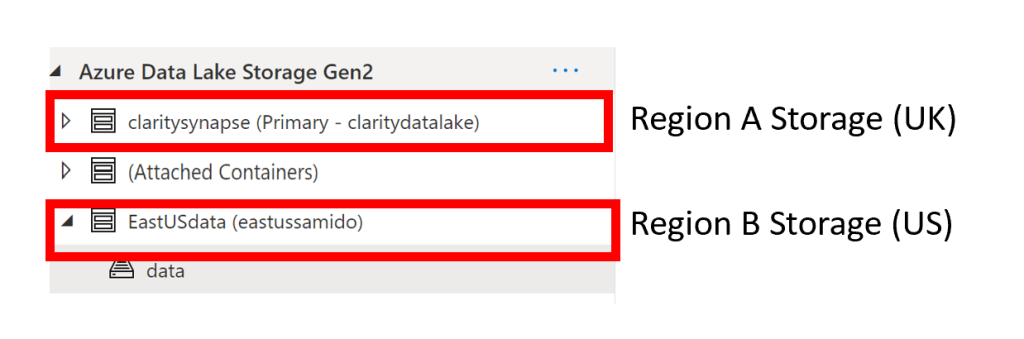
The storage accounts were then added as linked storage to the consuming Synapse workspace –
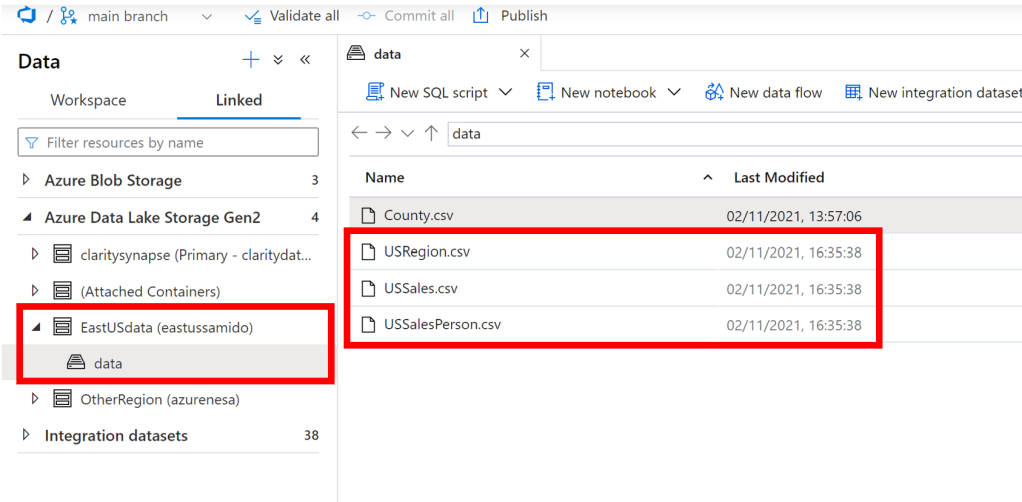
We then wrapped the files in Serverless SQL views to simplify the experience for end users –
SET ANSI_NULLS ON
GO
SET QUOTED_IDENTIFIER ON
GO
create view [dbo].[vUSSales]
as
SELECT
    TOP 100 *
FROM
    OPENROWSET(
        BULK 'https://<StorageAccount>.dfs.core.windows.net/data/USSales.csv',
        FORMAT = 'CSV',
        PARSER_VERSION = '2.0',
HEADER_ROW = TRUE
    ) AS [result]
GO
We then created our “One view to rule them all” that unioned these regional views together to create one single endpoint. We also applied a very simple RLS to prove the concept –
SET ANSI_NULLS ON
GO
SET QUOTED_IDENTIFIER ON
GO
CREATE view [dbo].[vAllSalesRLS]
as
select * from vUKSales
Where (SUSER_SNAME() = 'xxx@microsoft.com')
union all
select * from vUSSales
Where (SUSER_SNAME() = 'yyy@microsoft.com')
GO
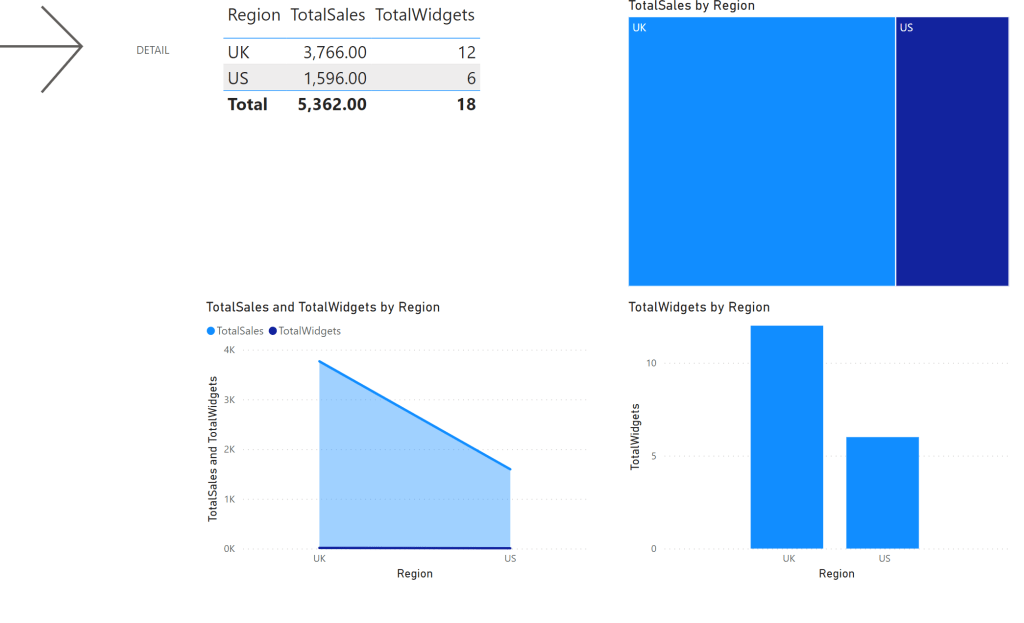
We then queried using Power BI in Direct Query using SSO (Single Sign On), which allowed us to leverage the RLS predicates in an elegant manner. In the two snippets below, the 1st is from an imported Power BI dataset that was used for high level aggregates, and the 2nd snippet shows how when the user navigates to the detail level data (Power BI Direct Query with SSO) it takes them to our vAllSales view and Row Level Security kicks and applies the necessary filter, all transparent to the user –
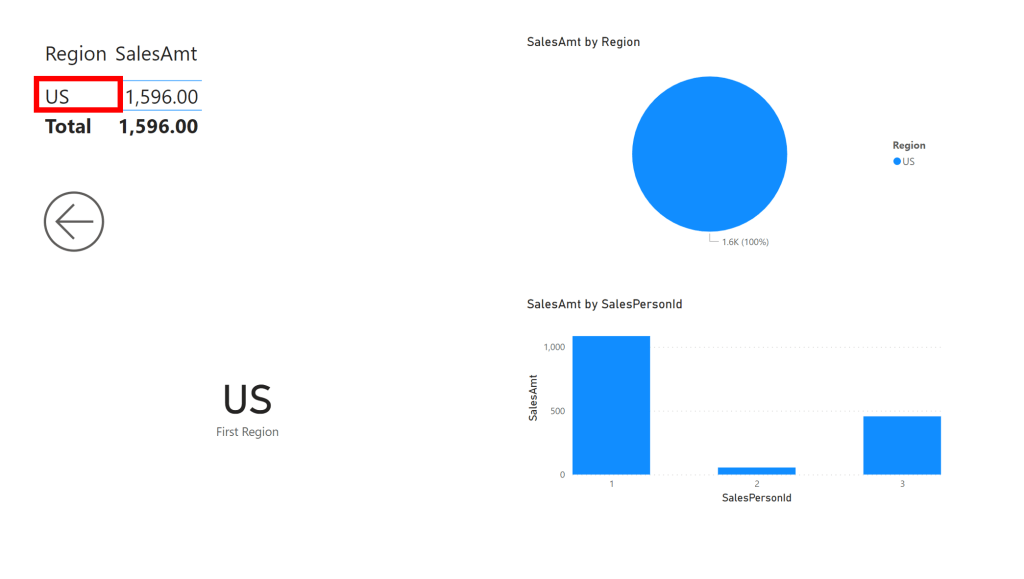
The user then sees both the high level aggregates plus the detailed data, which satisfied our “stay local” requirement.
Summary
Whilst this solution provides an elegant way of unifying datasets in realtime across disparate storage accounts in Synapse, there’s obviously a trade-off in performance, especially if you’re querying across different geographies where the laws of physics come into play. However there’s no reason you couldn’t use this for specific scenarios or either using it as a way to combine datasets into a logical view before ingesting into downstream systems.


Leave a Reply