
So this one is much closer to my “traditional” background working EDWs and databases over the past 20 or so years. I spent a good chunk of my career on the other side of the fence (SSIS packages, stored procedures that scrolled for days, the odd cursor I’m not proud of, “self commenting” SQL – the works), so anything that takes the grind out of moving legacy SQL onto Databricks is always a good thing. The latest is the agentic code converter, and it’s available now.
This post is a walkthrough of what it is, where Lakebridge still fits in, and the steps from a pile of legacy SQL to converted code in your workspace.
Also, for those who want a more visual walk through, check the explainer video below.
What Is the Agentic Code Converter?
As always, It would be remiss of me not to point you at the official agentic code converter documentation first. In its words, it “uses Genie Code to convert source SQL” into either Databricks SQL queries or Databricks notebooks that use the DataFrame API.
Right, so in plain English: you hand it your legacy SQL, it hands you back Databricks code. The interesting bit is the agentic part. When you run a conversion, Genie Code invokes a migration skill and deploys subagents that convert files concurrently. Each one:
- Analyses the source dialect,
- Generates the equivalent code for your chosen target,
- Validates the result (the docs say it checks the output is syntactically valid and semantically equivalent to the source), and
- Retries the sections that fail.
So rather than one big translation pass you then have to babysit, it’s a team of little workers that check their own homework. Think of it less as a translator and more as a small migration crew.
It currently speaks T-SQL, Snowflake SQL, Redshift SQL, Oracle, BigQuery and Teradata, and you pick the target per project: SQL (ANSI-compliant Databricks SQL) or Notebooks (the DataFrame API, with spark.sql where SQL is clearer). More dialects and platforms are on their way.
Where Does Lakebridge Fit?
If you’ve been anywhere near a migration to Databricks in the last year or so, you’ll have come across Lakebridge, the Databricks Labs toolkit that covers assessment, conversion and reconciliation. Our announcement blog describes the converter as “the next generation of data warehouse migration tooling, building on Lakebridge’s success at scale”, and one Lakebridge piece plugs straight in: the Analyzer.
The Lakebridge Analyzer scans your legacy SQL and ETL metadata and gives you three things: a job complexity assessment, a job inventory, and a cross-system interdependency map for migration sequencing and cutover planning. It knows 31 source technologies, which is a lot more than the converter’s six dialects, so it’s worth running across the whole estate.
Its JSON output is what the converter reads to show you, per file, a complexity assessment and a lineage dependency graph of the files and tables that have to migrate together. That last bit is the gold: it stops you converting a view before the three tables it depends on (I may or may not be speaking from experience).
The Scenario
Picture a typical estate: a SQL Server warehouse with a stack of T-SQL scripts and stored procedures that nobody wants to touch, and a team that would rather do anything other than have to re-code the whole lot. The plan:
- Run the Lakebridge Analyzer over the scripts to get complexity and lineage.
- Create a migration project in the workspace, point it at the scripts, and attach the Analyzer’s output.
- Convert a small batch first, review it, then do the rest.
- Teach Genie Code our house rules with a custom skill.
Prerequisites
- A workspace where a workspace admin has switched on the agentic code converter Beta from the Previews page.
- A workspace that meets the Genie Code requirements.
- Your source
.sqlfiles in the workspace (uploaded as workspace files or opened in the editor). - For the Analyzer: the Databricks CLI with the Lakebridge labs project installed, and your legacy code exported to a local folder.
- Something to compare against: equivalent test data on both sides, because “it parses” isn’t the same as “it’s right”.
The Fun Stuff
1. Run the Lakebridge Analyzer
First check Lakebridge is installed:
databricks labs lakebridge analyze --help
Then point it at your exported scripts. --generate-json true is the bit that matters here: it writes the JSON file the converter reads, alongside the Excel report it always produces (the paths are placeholders):
databricks labs lakebridge analyze \ --source-directory ./legacy-sql \ --report-file ./reports/analysis \ --source-tech <source technology> \ --generate-json true
If you leave out a required flag, it prompts you for it. Note the parent folder of --report-file has to exist already.
2. Upload Your SQL Files
Upload the .sql files with the workspace file browser, or use the Databricks CLI if you have a directory’s worth. Keep in mind the limits: up to 300 files per batch and up to 1,000 lines per script.
3. Create a Migration Project
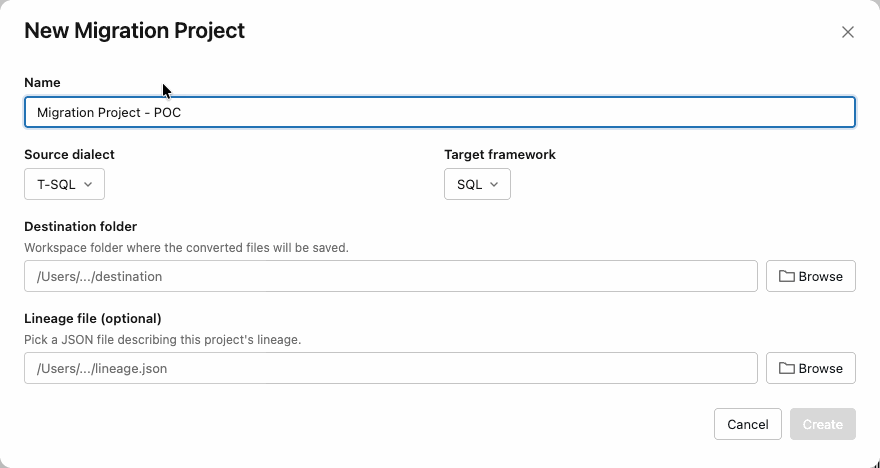
Click New > Migration project and fill in:
- A name,
- The source dialect (T-SQL here) and the target framework (SQL or Notebooks),
- A destination folder (required: this is where the converted code lands),
- An optional lineage file path: the Analyzer’s JSON from step 1.
A project tracks the state of every file, which is exactly what you want when you’re dealing with hundreds of them.
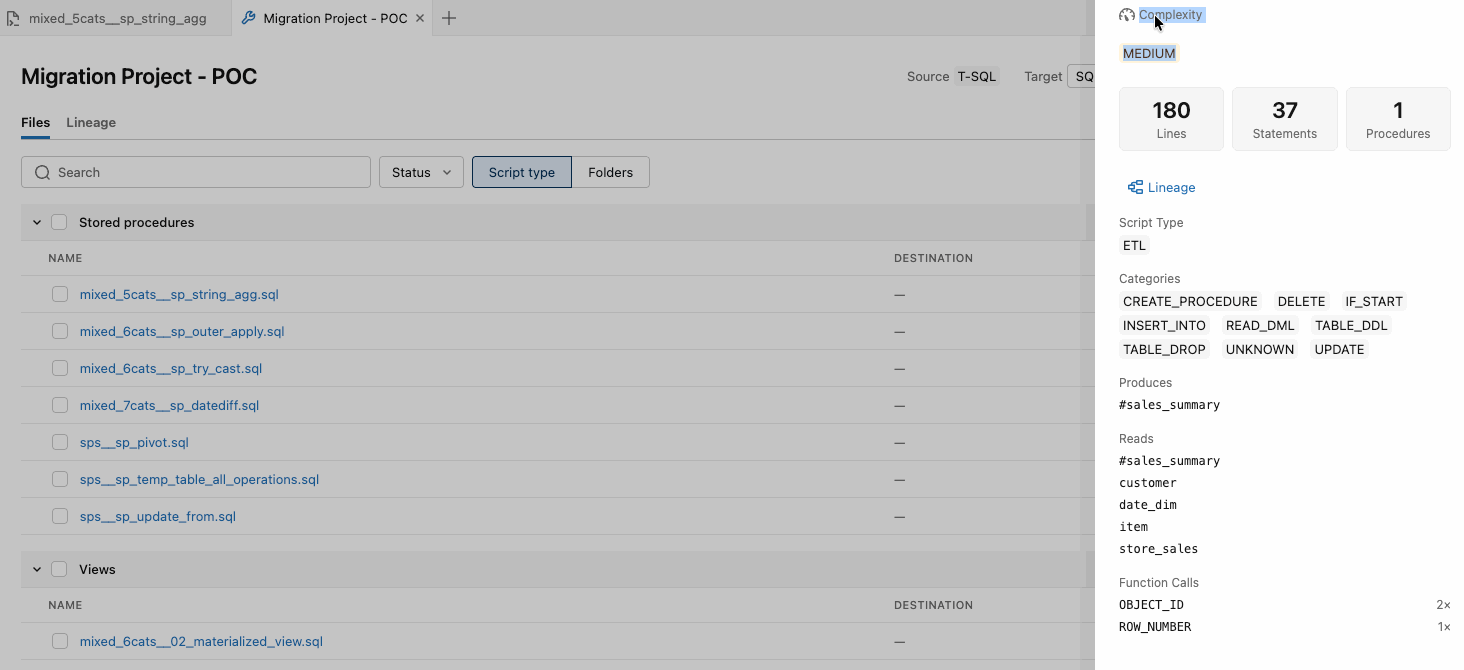
4. Add Files and Check Complexity and Lineage
Add files > + Add files, pick the folder, and each file shows up with its type, line count and conversion status. With the Analyzer output attached, you also get the per-file complexity and the lineage graph. Start with the simple, independent files and leave the tangled ones for when you trust the process.
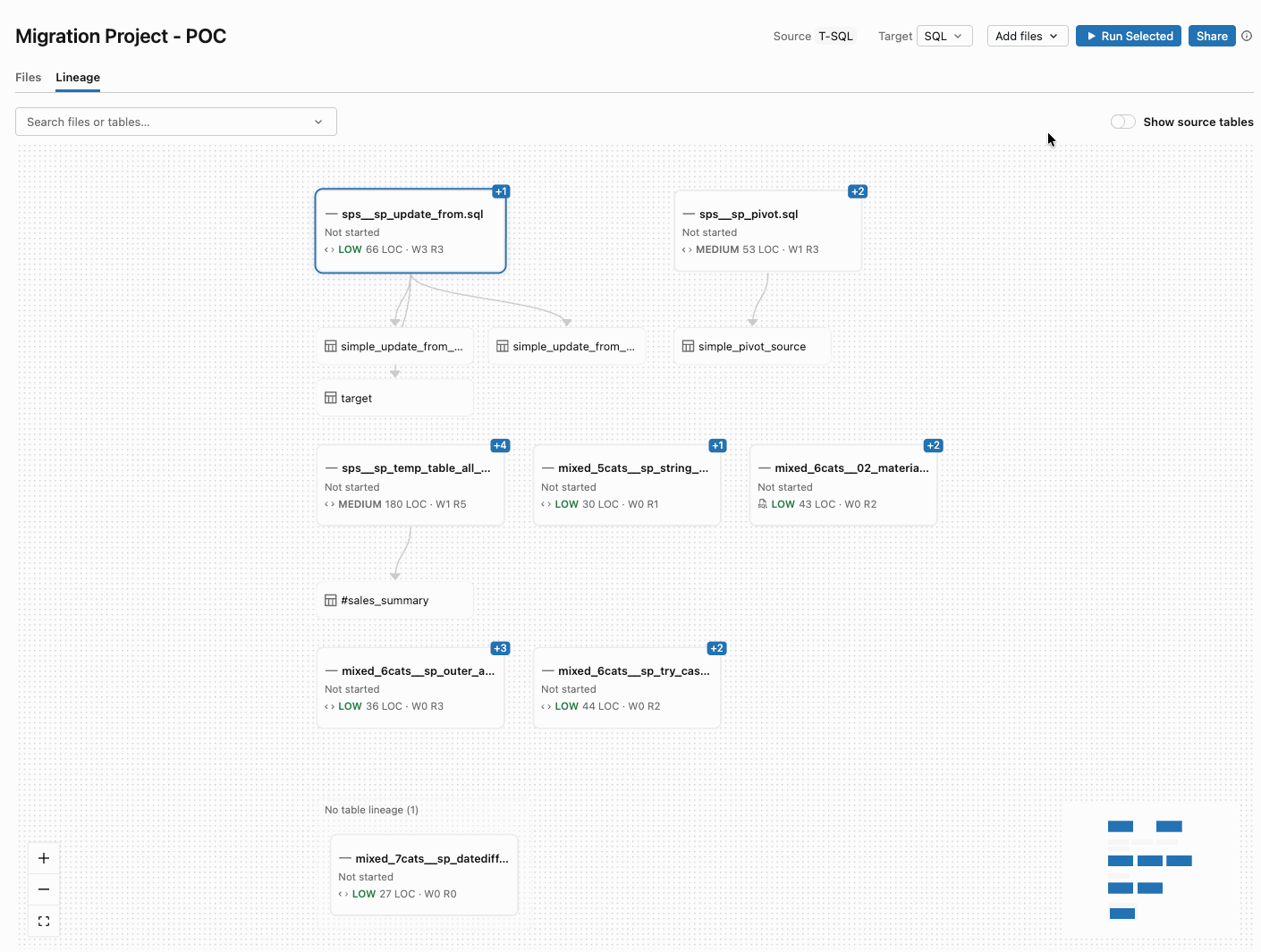
And the Lineage tab shows which files and tables are tied together, so you can see at a glance what can move on its own:
5. Run the Conversion
Select the files and click Run. This is where the subagents go to work, and each file gets a colour:
- Green — converted successfully
- Yellow — needs review
- Red — conversion failed
- Gray — still in progress
I like that “needs review” is a first-class state. It’s honest about where a human should look. In this example, six files came back green and two yellow:
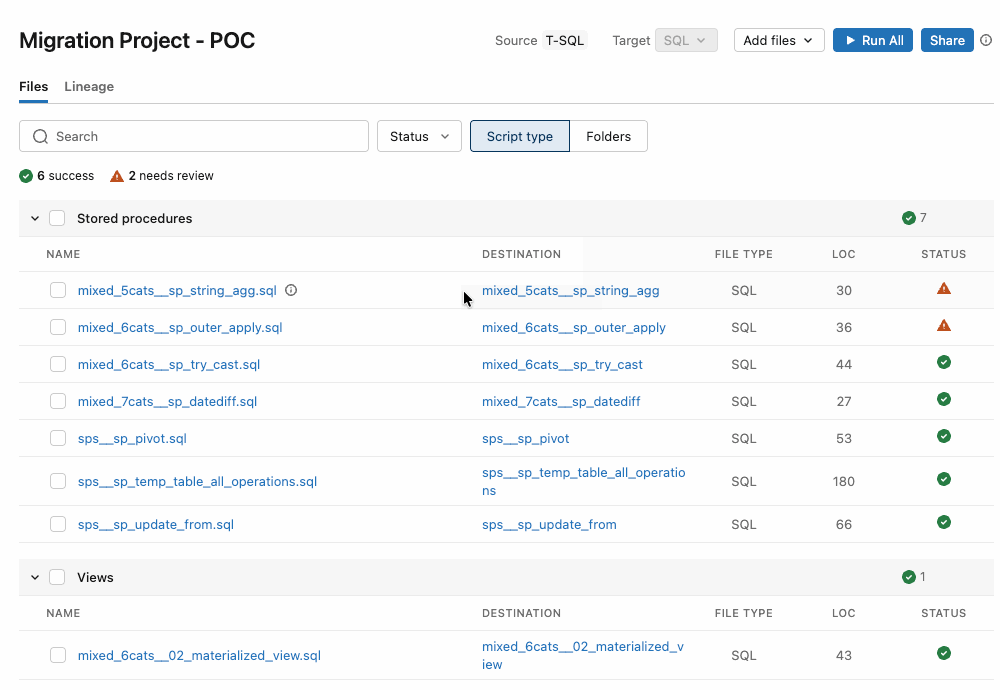
6. Review the Results
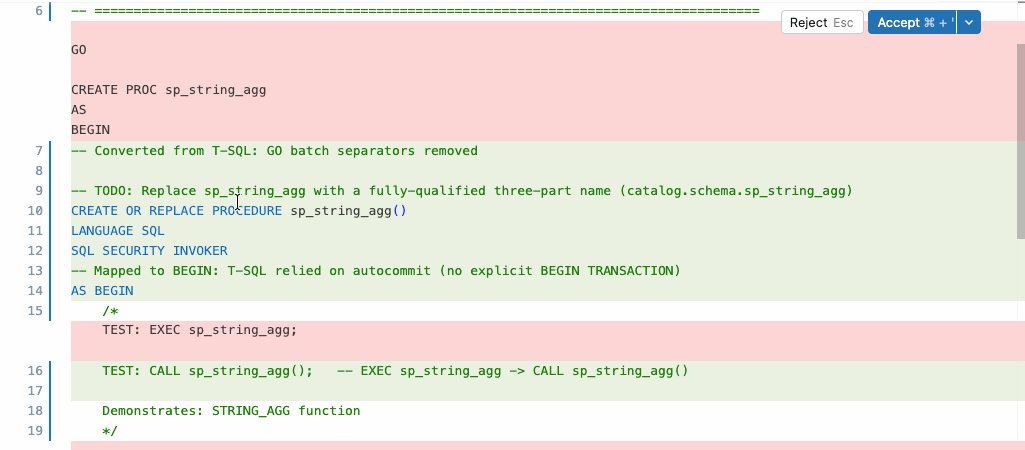
For SQL projects you get a side-by-side diff of the source and the proposed Databricks SQL, and you can accept all the changes or individual edits. For Notebooks projects you open the generated notebook. Failed files can be fixed by hand, or you can ask Genie Code to re-validate or retry the problem sections. Then run the output to make sure it actually works on Databricks.
7. Teach It Your House Rules with a Custom Skill
Every estate has its quirks. Custom skills encode business rules that Genie Code applies on every conversion, and they’re shared across the workspace. You can add a SKILL.md under Workspace/.assistant/skills/ (Genie Code settings > Open skills folder). This is a simple example but you get the idea:
---name: sql-migrationdescription: Conversion rules to apply when migrating legacy SQL to ANSI SQL.---Always convert the custom type MYDATE to TIMESTAMP_NTZ.
Or skip the file and just ask Genie Code in chat:
Always convert our custom type MYDATE to TIMESTAMP_NTZ. Save this as a custom migration skill.
Show me my migration skills lists them, and you can ask it to delete one too. In the announcement blog’s proof of concept, two of eight T-SQL stored procedures were flagged for review because they needed three-part Unity Catalog names; a custom skill is exactly the place for that kind of rule.
Tips Before You Go Big
Bot note: Start small — Convert two to five files first, check them, then scale up. The docs recommend it and so does every migration scar I have.
- Test the edge cases — Include dialect-specific constructs on purpose: T-SQL window functions, Snowflake
QUALIFY, RedshiftLISTAGG. - Compare results, not just syntax — Run original and converted queries on equivalent test data. Valid isn’t the same as correct.
- Mind the limits — 300 files per batch, 1,000 lines per script, and Teradata BTEQ scripts aren’t supported yet.
- No project needed for a one-off —
/migratein a Genie Code conversation converts a single file or folder.
Conclusion
That’s pretty much it. The agentic code converter takes the most tedious part of a migration, translating dialect after dialect, and hands it to a crew of subagents that check and retry their own work, while you stay in charge of review. With the Lakebridge Analyzer in front of it, you also know what you’re dealing with and in which order to move it.
It’s a Beta, so treat it like one: start small, review everything yellow, and test on real data before anyone says the word “cutover”. The announcement blog says more is coming, including more legacy ETL sources and target dialects, and data migration and reconciliation inside the migration project. Watch this space.
If you’d rather watch than read, the BrickBots explainer is embedded at the top of this post (or watch it on YouTube).
As always, let me know your thoughts (and your favourite legacy SQL horror stories, of course!).
Useful Links
- Convert SQL with the agentic code converter (docs)
- Convert proprietary code to open ANSI SQL with Genie Code (announcement blog, and the source of the screenshots in this post)
- Legacy SQL to Databricks: Meet the Agentic Code Converter (the BrickBots video)
- Lakebridge Analyzer
- Lakebridge overview
- Genie Code CLI – Genie Code in Your Terminal (my earlier post)


Leave a Reply